Why Choose Hermes?
Build desktop apps the way you build web apps
Native Menus
Real OS menus with keyboard accelerators that translate across platforms. Ctrl+S on Windows becomes Cmd+S on macOS automatically.
Dev Server
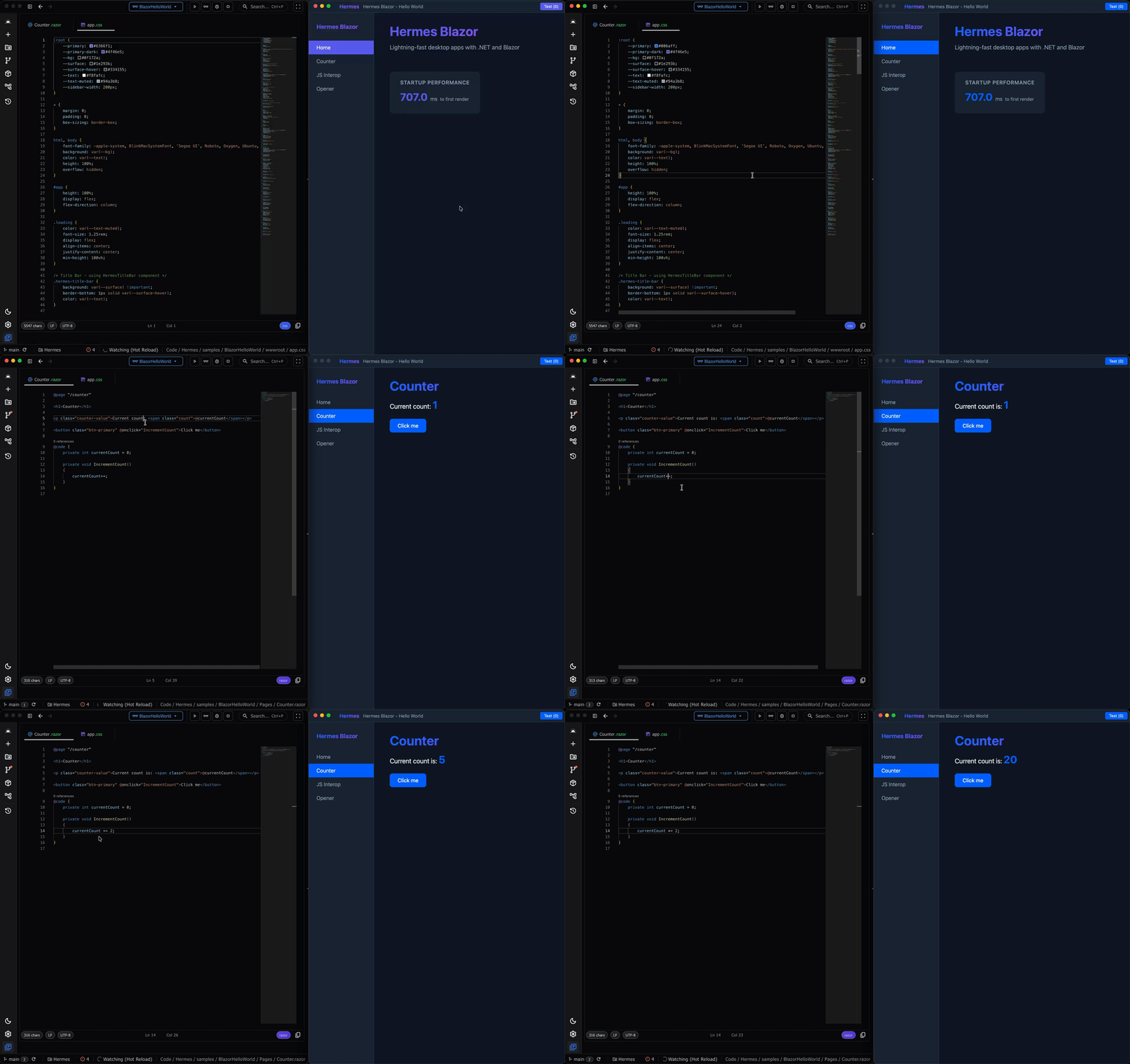
Zero-config hot reload — just run dotnet watch. Hermes auto-detects it, stands up
an internal Kestrel server, and live-reloads C# and CSS changes instantly.
AOT from Day One
Designed for Native AOT compilation using LibraryImport. Ship faster, smaller binaries.
First-Class Blazor
Implements IHostApplicationBuilder. Services, Configuration, and Logging work exactly like ASP.NET Core.
Fluent API
Chainable method syntax that reads like documentation. Configure windows, menus, and events with clean, discoverable code.
System Tray
Create tray-only apps that live entirely in the system tray with no dock or taskbar entry. Add tray icons with native context menus on every platform.
Native Menus, Fluent API
Build native menu bars with a chainable API. Add items, separators, accelerators, and handle clicks—all with runtime modification support for plugin architectures.
Platform-native keyboard accelerators
Runtime menu modification
ID-based item lookup
window.MenuBar
                            .AddMenu("File", file =>
                            {
                            file.AddItem("New", "file.new",
                            item => item.WithAccelerator("Ctrl+N"))
                            .AddItem("Open...", "file.open",
                            item => item.WithAccelerator("Ctrl+O"))
                            .AddSeparator()
                            .AddItem("Save", "file.save",
                            item => item.WithAccelerator("Ctrl+S"));
                            });

                            window.MenuBar.ItemClicked += id =>
                            {
                            if (id == "file.save") Save();
                            };
HermesWindow.Prewarm(); // Fast startup
var builder = HermesBlazorAppBuilder
.CreateDefault(args);
builder.ConfigureWindow(options =>
{
options.Title = "My Blazor App";
options.Width = 1024;
options.Height = 768;
options.CenterOnScreen = true;
});
builder.RootComponents.Add<App>("#app");
builder.Services.AddSingleton<IMyService, MyService>();
var app = builder.Build();
app.Run();Blazor Integration
HermesBlazorAppBuilder implements IHostApplicationBuilder—the standard Microsoft interface. Your existing Blazor skills and patterns transfer directly.
IHostApplicationBuilder compatible
Dependency injection support
appsettings.json configuration
Fast startup with Prewarm()
Dev Server with Hot Reload
Zero-config hot reload — just run dotnet watch. Hermes auto-detects it,
stands up an internal Kestrel server, and live-reloads C# and CSS changes instantly.
Automatic dotnet watch detection
Live C# and CSS reloading
Built-in Kestrel server — no setup required
How Hermes Compares
See how Hermes stacks up against alternatives
| Feature | Hermes | Photino | Electron |
|---|---|---|---|
| .NET Native | |||
| Native Menus | |||
| Native WebView | |||
| Minimal Native Layer | |||
| Native Dialogs | |||
| IHostApplicationBuilder | |||
| Dock Menu (macOS) | |||
| Single Instance | |||
| Autostart | |||
| Key-Value Store | |||
| Crash Reporting |
Platform Support
One codebase, three platforms
Windows
Windows 10/11 with WebView2
Pure C# via CsWin32macOS
macOS 12+ with WKWebView
Native via Obj-C shimLinux
x64 with WebKitGTK 4.x
Native via C shimPricing
Simple, predictable pricing for commercial use
Commercial
$695
/app/year
Commercial distribution rights
Per-application licensing
Priority support
License key included
Updates for license duration
Frequently Asked Questions
Common questions about Hermes
What is the difference between Hermes and Photino?
Hermes is the spiritual successor to Photino with enhanced native OS integration. Key differences include native menu support with keyboard accelerators, dock menus on macOS, context menus, a significantly smaller native layer, AOT compatibility from day one using LibraryImport, and implementation of IHostApplicationBuilder for a familiar ASP.NET Core-style developer experience.
Can I use my existing Blazor components?
Yes! Hermes provides first-class Blazor support through HermesBlazorAppBuilder. Your existing Razor components, services, and patterns work unchanged. The only difference is the host—instead of a browser, it's a native window.
What WebView does Hermes use?
Hermes uses the platform's native WebView: WebView2 on Windows, WKWebView on macOS, and WebKitGTK on Linux. This means your app renders consistently with the latest browser engine on each platform without bundling Chromium.
Do I need the commercial license for internal tools?
If your company revenue exceeds $1M and you're using Hermes for internal tools that are part of commercial operations, a commercial license will be required after GA. Internal tools at companies under $1M annual revenue qualify for the free tier.